Read the offer properly. Before you reply.
Paste a brand deal, a client brief, an investor's email or an offer to buy what you built. You get what it actually says, what it leaves out, and the questions to send back. Scams are caught on the way through.
On the Chrome Web StoreChecks run on your device. Nothing is uploaded.
Any offer, read in about ten seconds
You do not need a flooded inbox for this to be worth it. One offer is enough.
Paste it, or check it where it sits
Paste the message here, or install the extension and check it inside Gmail, LinkedIn, Instagram or TikTok without copying anything out.
See what it says, and what it leaves out
The fee, the scope, the dates, the rights, the payment terms: pulled out in plain words. Then the terms that are not mentioned at all, which is where the money usually goes missing.
Send the questions back
Every gap comes with the question that asks for it, written so you can copy the lot into your reply. Scam signals, when there are any, come with the evidence and what to do.
Anyone who gets offers from strangers
The same three questions, whoever is writing to you: is this real, what does it actually say, and what is missing.
Creators, at any size
A first "ambassador" DM is as worth checking as a fiftieth. Most of what arrives at a small account is a pitch to buy something, or a fake.
- "Free product, just pay shipping"
- A real brand deal missing usage rights, exclusivity or a kill fee
- Sponsorship emails carrying a "game build" to install
Founders and indie makers
Inbound to a small company is investors, buyers, partners and notices that look official. Each has its own short list of things that cost you money when nobody wrote them down.
- An investor charging a "due diligence fee" before they invest
- An offer for your extension, app or domain, paid after you transfer it
- "Your item will be removed" notices that are not from the store
Freelancers
A client brief with no deposit, no revision limit and no kill fee is the expensive kind of yes.
- Overpayment and "pay our vendor" cheque scams
- Clients who want to pay outside the marketplace that protects you
- Briefs that never mention who owns the work
See the exact words behind every flag
No black-box score. Every signal quotes the message, says why it matters and what to do next, so you can decide in ten seconds and explain it to your manager in one line.
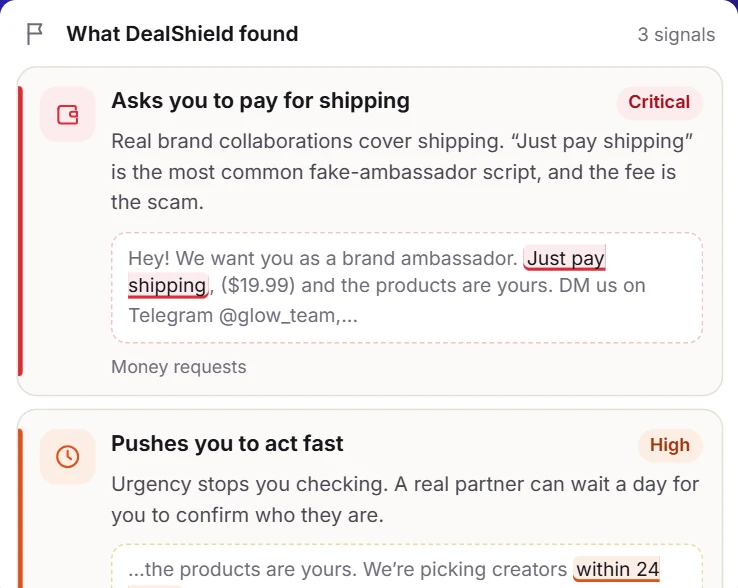
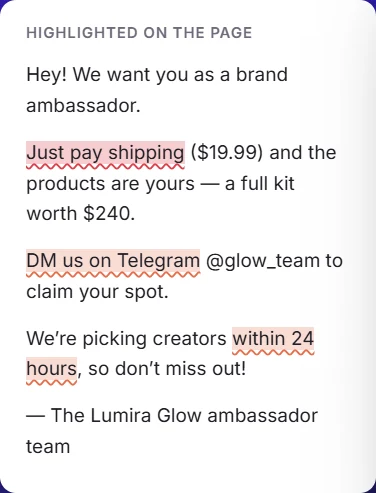
- "Just pay shipping", fake ambassador programmes and gift-card asks
- Pressure tactics, requests for login codes, moving you to Telegram
- Plain next steps: what to verify, and what never to send
Catch the links and senders built to fool you
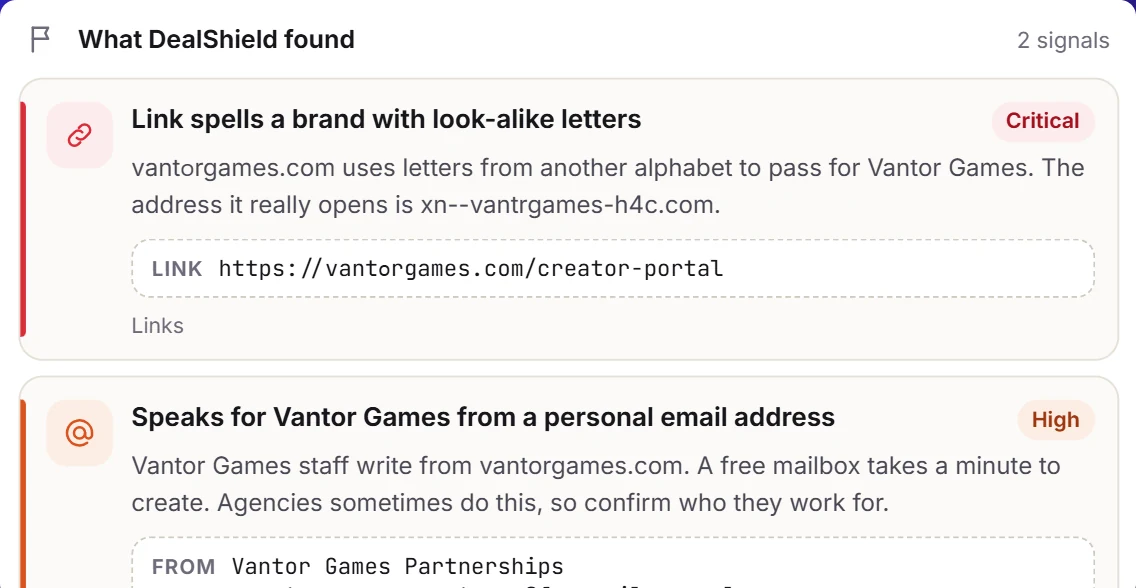
Swapped letters, other alphabets, brands "writing" from a Gmail address. DealShield checks where every link really goes and who really sent it, before you click.
- Homograph and look-alike domains, decoded
- Free mailboxes speaking for a brand
- Reply-to and sign-in traps in the headers
Go deeper on the ones you want
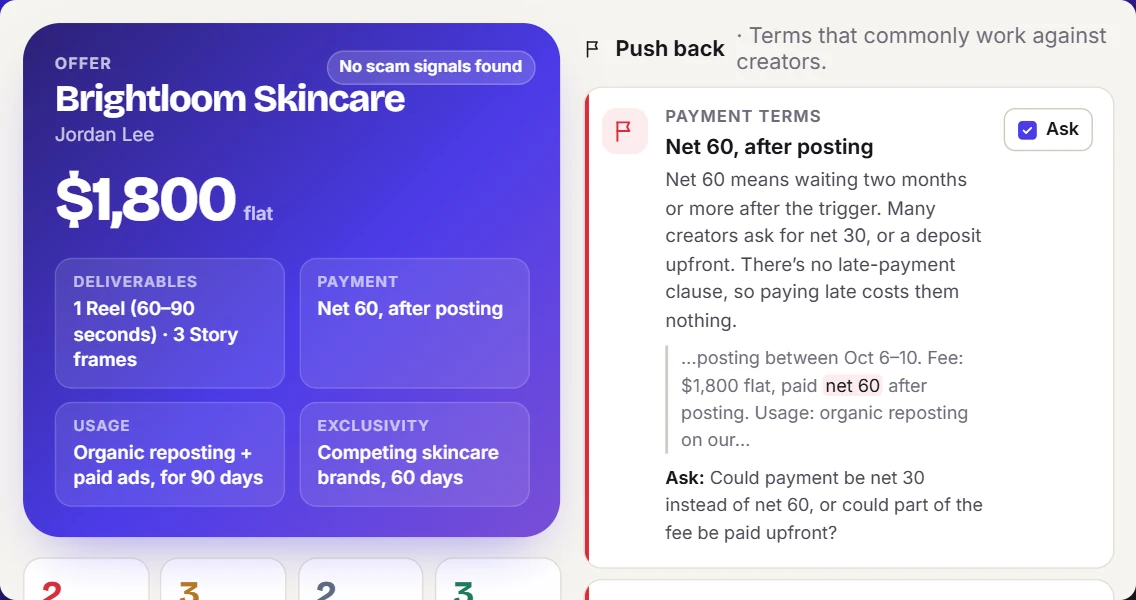
The read is free on every check. Pro adds what each term means for you, how the fee compares with your own rate card, a reply you can send, and a record of the whole thing.
- Net 60 and "paid after posting" called out, with a counter to ask for
- Revised contracts compared line by line
- Your own rate card, checked against every offer
The part a browser extension can't do
An extension lives in the tab you have open. The deal outlives it: the rate you agreed, the invoice you sent, the brand that went quiet for six weeks. That is what this site keeps.
- Your own rate card, and every offer checked against it
- Invoices with due dates, and what is already late
- A private address to forward brand email to, on any provider
- Scam domains other creators reported, before you reply
When the offers do pile up
If you are getting pitched daily, Pro scans your busiest inboxes every hour, ranks what arrived and syncs it to your dashboard. If you are not, the free checks are the point.
Free to protect you. Pro to grow you.
Free
Everything you need to never fall for a fake offer.
- Unlimited scam checks in the Chrome extension
- 3 checks here on the web to try it
- A private address to forward brand emails to
- Your offers ranked on one dashboard
- Facebook, LinkedIn, X, Telegram and more in the extension
Creator Pro
Or $99 a year, or $120 once. 7-day free trial.
- Automatic scanning of TikTok, Instagram, WhatsApp, Gmail and Outlook
- Hourly scans, synced to this dashboard
- Deal reviews, revised-contract diffs and reply drafts
- Rate benchmarks, invoice reminders and text alerts
- One purchase covers the extension and the site
Straight answers
What is DealShield on OfferVet?
DealShield is the offer-vetting tool at OfferVet.com. It reads an offer sent to a creator, freelancer or founder: what it actually says, which terms are missing, the questions to send back, and any scam signals, with the evidence quoted.
Does DealShield read my DMs?
The Chrome extension reads a message on your device when you ask it to, or on the inboxes you switch on. Message text is never uploaded. The site only ever sees what you forward, paste, or choose to sync.
Do I need the extension to use the site?
No. Sign up, forward brand emails to your private DealShield address and they arrive ranked. The extension adds the DMs no platform lets a website read, like TikTok, Instagram and WhatsApp, and unlimited free checks.
Can you log into my TikTok or Instagram?
No, and no honest tool can: neither platform exposes personal DMs through an API. That is the one job the extension does that a website cannot.
Is the scam checking free?
Yes. Checks in the Chrome extension are free and unlimited, for good. On the website a free account gets 3 checks to try it, then the extension takes over. Creator Pro adds automatic TikTok, Instagram, WhatsApp, Gmail and Outlook scanning, synced DMs, text alerts, rate benchmarks and invoice tracking.
What happens when my trial ends?
You keep every offer, note and invoice. The Pro extras switch off and the free ones keep working. There is no card on file during the trial.
There is an offer in your inbox right now.
Start free, connect your inboxes, and let DealShield find it, and stop the scams around it.